
Bulin 47 AI vs CapCut: which makes the better Bulin 47 video?
Filming and editing it yourself in CapCut, or putting yourself in the original freestyle from one photo: how the two compare.
By Bulin 47 AI · Updated
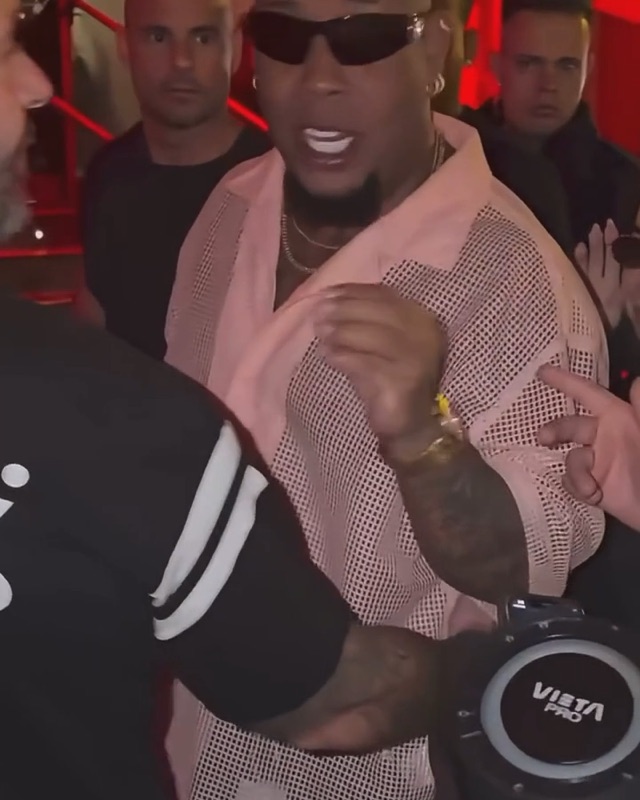
Bulin 47 AI vs CapCut, side by side
| Bulin 47 AI | CapCut | |
|---|---|---|
| What you start from | One photo of you (one adult, facing the camera) | Your own footage, or a template plus your photos or clips |
| The scene | The original Bulin 47 freestyle clip, recast with you in Bulin’s spot | Whatever you film, or what the template’s creator built |
| Audio | The original freestyle audio, with your mouth in sync | The Bulin 47 sound added in the editor; syncing is up to you |
| Editing | None: the clip, moves and audio are preloaded | You trim, sync and export in the app |
| Lengths | Hook 5 s, Freestyle 12 s, Full verse 23 s | Up to you or the template |
| Where it runs | Any browser, phone or desktop; nothing to install | The CapCut app or CapCut online |
| Watermark on the download | None | Depends on your CapCut plan and the template |
How people make the Bulin 47 video in CapCut
The tutorials that circulate in Spanish (“cómo hacer el video de Bulin 47 en CapCut”) describe two routes:
- Film and lip-sync. Record yourself doing the hand gestures and the shoulder bounce, add the Bulin 47 sound in CapCut, and line your mouth up with the bars.
- Use a shared template. The Bulin 47 and Dame Hombro templates that tutorials point to are made by CapCut users and shared through links in TikTok videos. You open the link, drop in your media and export. Because they are user-made, they change, break or disappear, and what they do varies from one to the next.
Neither route puts you inside the original clip: you get your own room, or the template creator’s effect, not the red-lit entrance with Kevin Wai and the speaker.
How the one-photo Bulin 47 template works
- Open the Bulin 47 AI video maker and pick a cut: 5, 12 or 23 seconds.
- Upload one front-facing photo of yourself.
- Pick 480p, 720p or 1080p and press Generate.
- Download the vertical MP4, with the original audio and no watermark, and post it.
The full walkthrough is in how to make a Bulin 47 AI video.
Which one should you use?
- Use CapCut if you want to perform it yourself, add your own edits, or do the Dame Hombro dance challenge.
- Use Bulin 47 AI if you want the real scene, with you as the freestyler, without filming, syncing or editing anything.
- Use both: make the AI version here, then bring the MP4 into CapCut to add text or cut it into a longer edit.
CapCut details reflect public tutorials and pages as of November 2026. CapCut is a trademark of its owner; Bulin 47 AI is not affiliated with CapCut.